
Ergonomics means designing for the people who use a space, not asking them to adapt to it. In an office, most of that work happens before any furniture arrives: where the windows fall, how air moves, how wide the corridors are, and where the quiet rooms sit. Get these right and the desks and chairs have an easier job. Get them wrong and no chair can make up for it.
This guide covers the office environment as a whole. Desk height, chair adjustment and monitor position are covered separately in our workstation guide.
Why ergonomics starts with the space
Poor ergonomics rarely shows up as one big problem. It shows up as squinting at a screen by the window, a cold corner everyone avoids, a corridor where two people cannot pass, or a meeting room where the next room can hear every word. Over months these become eye strain, headaches, fatigue and lower focus.
Good ergonomic design works on five things at once:
| Area | What it protects | Typical symptom when ignored |
|---|---|---|
| Light | Eyes, mood, alertness | Glare, headaches, afternoon slump |
| Temperature and air | Comfort, concentration | Drowsiness, complaints, heaters and fans at desks |
| Circulation | Safety, flow, dignity | Bottlenecks, bumping, avoided routes |
| Open space | Mental ease, flexibility | A cramped, tense floor |
| Privacy and sound | Focus, confidentiality | Overheard calls, distracted teams |
Lighting: natural, ambient and task
Poor lighting causes eye strain, headaches and reduced focus. The fix is not simply more light but the right layers of it: natural light first, general (ambient) light to even out the room, and adjustable task light where detailed work happens. Relying on overhead lighting alone is the most common mistake.
How to use natural light well
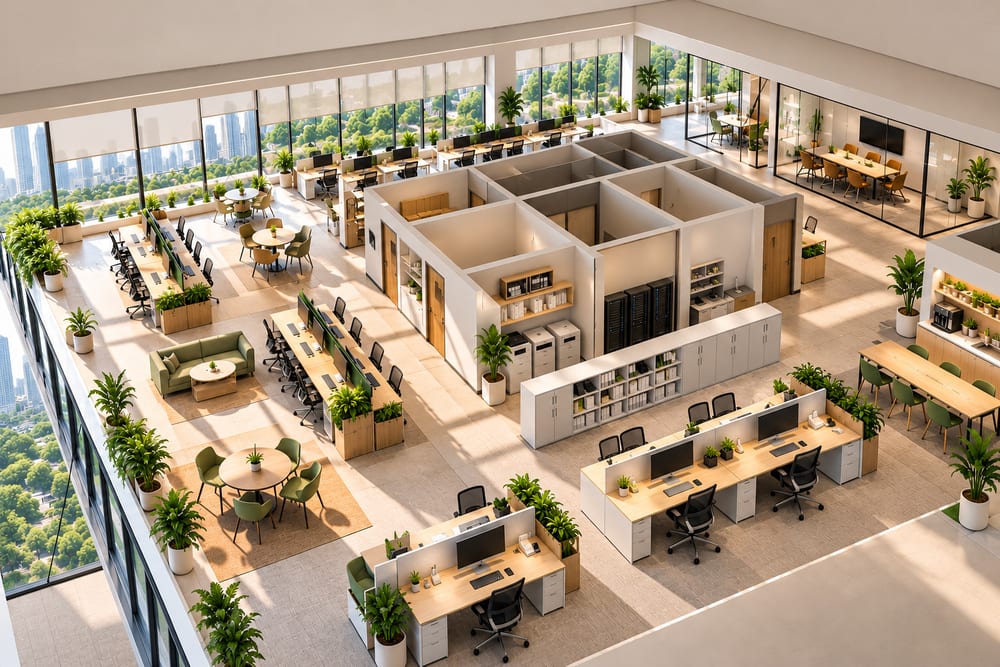
- Give daylight to the places people stay longest. Put regular workspaces, collaboration areas and breakout zones near windows. Put storage, printers, server racks and utility rooms in the core of the floor.
- Keep glass partitions near the edge. Glazed meeting-room fronts and low partitions let light travel deeper into the plan. Tall solid cabinets along the window wall block it.
- Control glare, not light. Direct sun on a screen is worse than no sun. Use sheer roller blinds, blinds with adjustable slats or light-filtering film so the daylight stays but the glare goes. Orient screens at right angles to windows, not facing or backing onto them.
- Use light finishes. Pale ceilings and walls, and matt finishes, bounce daylight deeper. Glossy desktops and glossy wall panels can reflect glare into eyes.
- Add views. A view of greenery or the sky gives eyes a place to rest and supports wellbeing. Plants and natural materials inside the office carry some of the same benefit where views are limited.
Layering the artificial light
- Ambient: even, shadow-free general lighting so the room feels bright without hot spots.
- Task: adjustable, directional lamps that people can position away from their screen. This matters most for reading, drawing, accounts and review work.
- Accent: wall washers and feature lighting in reception and breakout areas, so the office does not feel flat.
Design note: A common planning target for general office lighting is around 300 to 500 lux at work height, with more for detailed tasks. Daylight changes through the day, so dimmable or zoned fittings that follow the window line let you top up light only where it is needed and save power.
Temperature and air
Temperature is an ergonomic factor, not just a comfort extra. People who are too warm get drowsy, and people who are too cold get distracted and tense. Window placement, air-conditioning layout and insulation all decide how steady the temperature feels across the year.
Monitor it, do not guess it
- Place sensors at working height in several zones, not only near the thermostat. Window edges, the core, meeting rooms and the pantry side often differ by several degrees.
- Log it for a few weeks after handover. Cold or hot spots that appear at the same time each day usually point to a vent position or a sun-facing window, and are easier to fix with data.
- Aim for a steady band. Many offices in India work well at roughly 23 to 26 degrees Celsius with moderate humidity. Large swings matter more than the exact number.
- Zone the cooling. Meeting rooms fill and empty quickly, and west-facing edges heat up in the afternoon. Separate controls prevent over-cooling the whole floor to fix one corner.
- Keep vents off people. Direct cold air onto a seat is the most frequent cause of "the AC is too cold" complaints. Reposition diffusers or desks before lowering the setpoint.
Air quality
Ventilation, filtration and indoor plants all contribute to a healthier space. Fresh-air supply matters especially in meeting rooms and small enclosed rooms, where air goes stale quickly. Choose low-emission, non-toxic finishes and furniture so the air is clean from the first day.
Walkways and circulation
Layouts should let people move through the office without bumping into furniture or backtracking. Circulation is easy to overlook on a drawing and very noticeable once the team moves in.
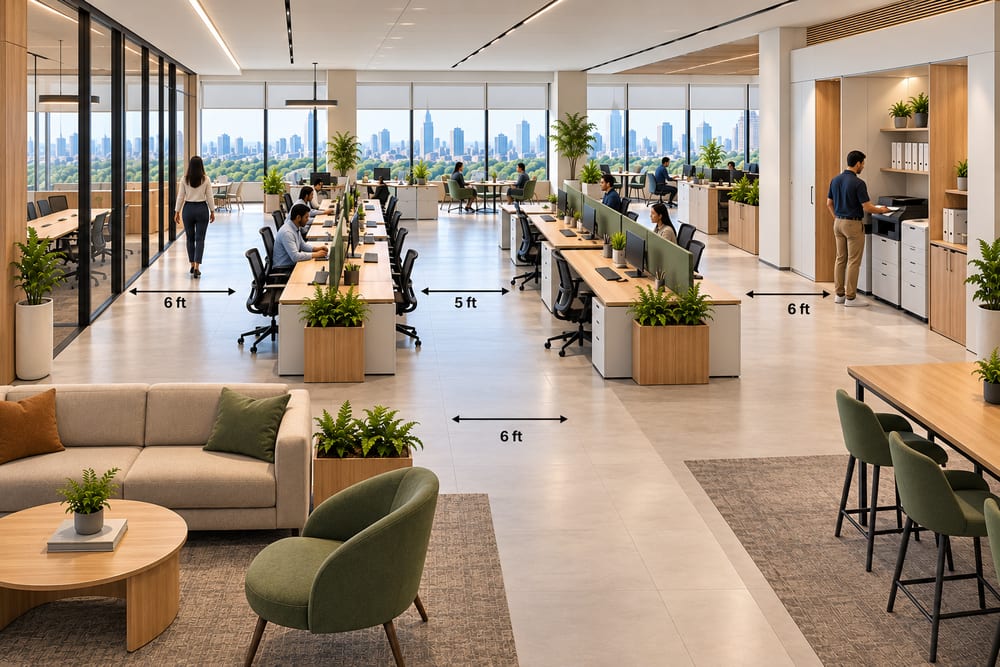
| Route | Common planning width | Why |
|---|---|---|
| Between workstations | 5 to 6 feet (1.5 to 1.8 m) | Room to pull a chair out and still let someone walk behind comfortably |
| Main corridors | 6 feet (1.8 m) or more | Two people can pass comfortably |
| In front of storage and printers | Extra clearance for doors and queues | People stop and stand here |
| Exits and fire routes | As per local fire code | Safety, never to be blocked by furniture |
These are typical planning figures, not code requirements. Always check the applicable building and fire regulations for your premises.
- Make routes obvious. Direct, logical paths to the entrance, pantry, washrooms and meeting rooms stop people cutting through work areas.
- Keep shared things on the main path, not inside it. Place printers and pantry away from the busiest line of movement so queues do not block it.
- Do not let walkways run behind desks. A person at a desk should not feel people passing close behind their back all day.
- Choose safe floors. Slip-resistant surfaces, rounded furniture corners and flush thresholds reduce trips and knocks. Cables should never cross a route.
- Design for everyone. Wide doors, level transitions and turning space for wheelchairs make the office usable by all body types and abilities, and easier for everyone carrying a laptop and a coffee.
The value of empty space
Empty space is not wasted space. It is what keeps a floor from feeling crowded, gives circulation room, and lets a layout change as the team grows. A fully packed plan has no room to adapt and no room to breathe.
- Leave breathing room around high-use areas like reception, the pantry and meeting-room entrances, where people gather and wait.
- Plan flexible zones. An open area with movable furniture can host a town hall one week and a workshop the next. Open layouts also help teamwork.
- Plan a pause. A bench, a plant corner or a window nook that is deliberately underused gives people a place to step away and reset. Regular movement breaks are part of healthy work, and the space should invite them.
- Resist filling every corner. If the plan only works with every square foot occupied, the headcount is already too high for the area.
Rule of thumb: Keep roughly a quarter to a third of the floor free of furniture once circulation, breakout and flexible areas are counted. It is the same idea as the 70-30 rule applied to a workplace.
Privacy for meeting rooms
Meeting rooms need two kinds of privacy: acoustic (sound should not escape) and visual (people outside should not see sensitive content). They also need to be comfortable enough that people actually use them.
Sound privacy
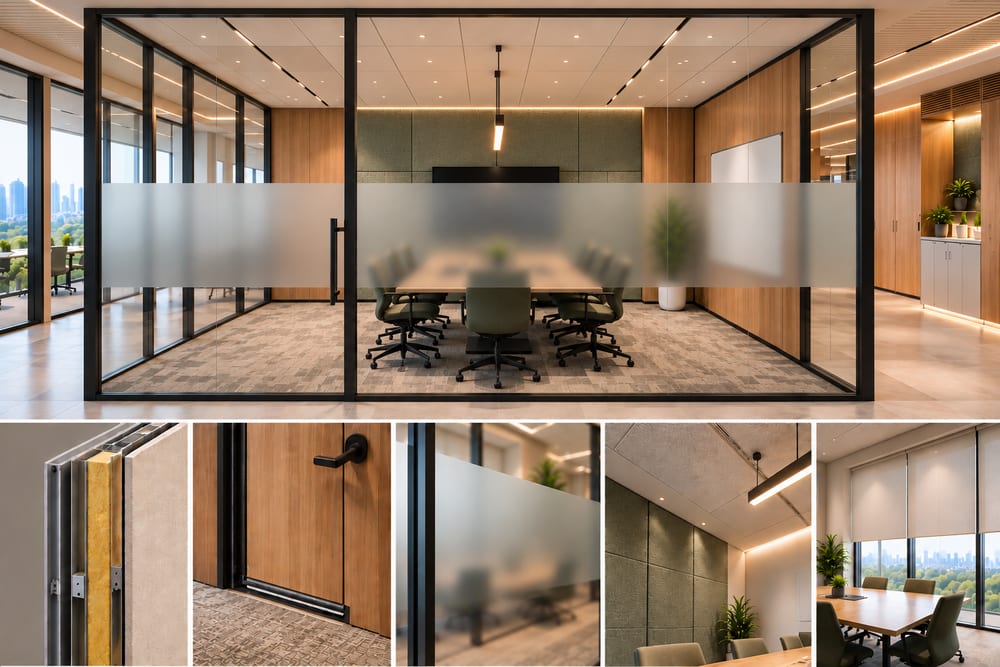
- Build the walls properly. Partitions should run slab to slab, not stop at false ceiling level, or sound passes straight over the top. Use insulated partitions and sealed doors.
- Treat the doors and glass. Solid-core doors with acoustic seals and double-glazed or laminated glass reduce leakage far more than standard glass.
- Absorb inside the room. Carpet, acoustic ceiling tiles, fabric-wrapped panels and curtains reduce echo, so people speak naturally and do not raise their voices.
- Locate them thoughtfully. Put meeting rooms between noisy zones (pantry, reception) and quiet zones with a buffer such as storage or a corridor, not directly against focus areas.
Visual privacy
- Use frosted bands at standing and seated eye level on glass fronts, or switchable privacy glass for rooms that are sometimes open and sometimes confidential.
- Keep screens and whiteboards away from glazed walls and door lines.
- Provide blinds that can be closed without losing daylight entirely.
Room comfort
Rooms packed with people heat up and run out of fresh air quickly. Give meeting rooms their own temperature and ventilation control, glare-free light, and a size that suits the number of people they actually host. Small huddle rooms and phone booths for one to four people usually serve a team better than a few oversized boardrooms.
Seating beyond the desk
Good seating in an office is not only the desk chair. Collaboration, waiting and break areas each need seating chosen for how long people stay and what they do there. Task chair choice and adjustment are covered in our workstation guide.
| Area | Seating that works | Ergonomic point |
|---|---|---|
| Meeting rooms | Chairs with back support and a stable base | Meetings often run an hour or more, so avoid stools and hard seats |
| Breakout and lounge | Sofas with suitable seat depth, arranged for easy conversation | Angle seats toward each other; leave space to get in and out |
| Reception | Firm, easy-to-rise-from seating | Visitors should be able to stand without effort; keep a side table in reach |
| Pantry and cafe | Mix of seat heights; some with backs | Gives variety and avoids long perching on stools |
| Standing and perch points | High tables and leaning stools for short meetings | Offers movement and a change of posture |
- Offer variety. Different postures through the day relieve strain. Provide sitting, perching and standing options across the floor.
- Size for different bodies. Shared seating should suit a range of heights and builds, with soft, breathable fabrics for long use.
- Keep it mobile. Lightweight, movable seating lets a team reconfigure a space without calling facilities.
Acoustics and noise
Noise control belongs next to privacy, because the same materials solve both. Carpets, soft furnishings, acoustic panels and ceiling treatment reduce echo and background noise, which matters most in open-plan areas. Add quiet zones for concentrated work and keep loud functions, such as the pantry, away from them.
A quick ergonomic audit
Walk the floor at three different times of day and ask:
- Is there glare on any screen at any hour? Is anyone using blinds permanently closed?
- Are there spots people consistently avoid because they are too hot, too cold or draughty?
- Can two people pass in every corridor without turning sideways?
- Is there somewhere to pause or step away that is not a desk?
- Can you hear a normal conversation from inside each meeting room?
- Is there a seat other than a desk chair for every kind of activity?
How we approach it at Tryakshaay
We start office projects from the plan rather than the furniture. We study where daylight enters, where the air-conditioning can reach, and how people will move through the floor, then place work areas, meeting rooms and quiet spaces to suit. Furniture and finishes follow. If you are planning or renovating an office, we are happy to review your current layout and suggest practical improvements.
Figures in this guide are general planning guidelines, not strict rules. The right values depend on your building, local regulations, climate and team.